
Made to measure
Every rule is yours to choose. A rule you leave unset changes nothing, and dotnet dress init writes every rule with its default into your EditorConfig, so the whole fit is in one file you can read.
DressSharp · bespoke C# formatting
DressSharp cuts every line of your C# to the measurements you choose, and leaves the rest exactly as it was. Nothing off the rack, and nothing you did not ask for.
dotnet dress initWrites every rule, set to its default, into your EditorConfig. The whole fit is in one file you can read and change.
dotnet dressFormats your code to those measurements, and only those. A rule you leave unset changes nothing.
dotnet dress format --stagedHook it into your commits or your coding agent, and everything you touch arrives already pressed.
One run of dotnet dress with the default rules. The chalk line is max_line_length = 160.
using System.Linq;
using System;

namespace Shop.Orders {
    public class OrderTotals {
        readonly IPricing pricing; readonly ILogger log;
        public OrderTotals( IPricing pricing,ILogger log ) { this.pricing=pricing; this.log = log; }

        public decimal Total(Order order, bool includeShipping) {
            if(order.Lines.Count==0) return 0m;
            var subtotal = order.Lines.Where(line => line.Quantity > 0).Sum(line => pricing.PriceFor(line.Sku, line.Quantity, order.Customer.Tier, order.CurrencyCode));
            var shipping = includeShipping ? pricing.Shipping(order.Destination, order.Weight, order.Customer.Tier) : 0m;
            log.Info($"Order {order.Id}: {subtotal} + {shipping}");
            return subtotal+shipping;
        }
    }
}dotnet dress interactive
Choosing formatting rules from a list of settings is guesswork. The fitting room opens your EditorConfig in the browser, fully offline, with code in the mirror, so you see exactly what every rule does before you commit to it.
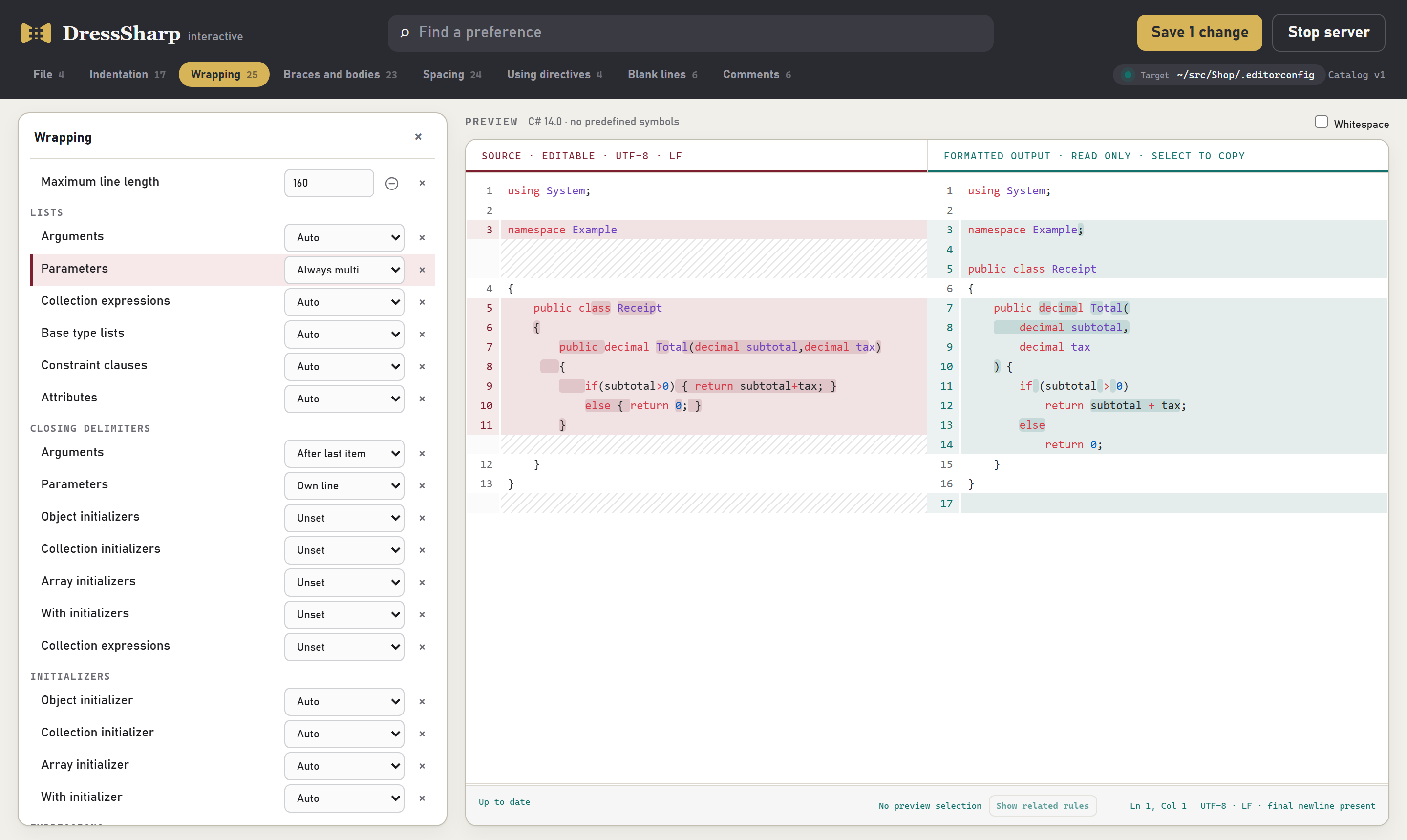
Flip a rule and the preview re-cuts on the spot, your original beside the result.
Paste in the code you actually write, not a tidy sample.
Select any lines to see just the rules that shaped them.
One click writes your choices straight into your EditorConfig.
dotnet dress interactiveHow to choose your rules →
Every rule is yours to choose. A rule you leave unset changes nothing, and dotnet dress init writes every rule with its default into your EditorConfig, so the whole fit is in one file you can read.
The csharp_* and dotnet_* settings your team already uses work as they do in Visual Studio. Where they stop, DressSharp picks up: list wrapping, closing delimiters, comment alignment, blank lines, and more.
Run it on every commit, or every time your coding agent writes a file. It only touches what changed, so it stays out of your way, and formatting never comes up in code review again.
Every rule, grouped by what it shapes. Open a group to see what each setting does to your code.
Line endings, charset, final newlines and trailing whitespace.
4 rules →Tabs or spaces, and how blocks, braces, switches and lambdas indent.
17 rules →Line length, and how arguments, parameters, initializers and expressions wrap.
25 rules →Brace placement, namespace style, expression bodies and modifier order.
23 rules →Spaces around operators, commas, keywords, brackets and calls.
24 rules →How using directives are ordered and grouped.
4 rules →Blank lines around types, between members, and how many in a row.
6 rules →Comment spacing, alignment and XML documentation layout.
6 rules →Ready for your first fitting?
dotnet tool install --global DressSharpdotnet dress initdotnet dress interactive